title-block
TEXT and MTEXT inside a block whose name contains TITLE, TBLK, SCHRIFTFELD or CARTOUCHE, or placed in the bottom-right quarter of a paper layout.
cadboss text plant.dxf --group title-block, all lines
DRAWN
CHECKED
SCALE
REV
cadboss reads DXF drawings, pulls out every piece of text, the metadata and the structure, and hands it to a search index as Markdown or JSON. One core, a CLI, and pythonic bindings.
Prebuilt abi3 wheels for CPython 3.12 and later, no toolchain required.
What comes out
A drawing carries more words than it looks: the title block, the tags on every pump and valve, the notes, the dimension overrides, the layer and block names, the paths of the xrefs and images it pulls in, the hyperlinks on entities. cadboss sorts them into five groups and keeps the metadata beside them.
The samples are real output for plant.dxf, a copy of the repository’s demo drawing: a pump-station layout with two tagged pumps, a title block on its own sheet, a stacked tolerance, a multi-line note, an xref, an image and a hyperlink.
TEXT and MTEXT inside a block whose name contains TITLE, TBLK, SCHRIFTFELD or CARTOUCHE, or placed in the bottom-right quarter of a paper layout.
cadboss text plant.dxf --group title-block, all lines
DRAWN CHECKED SCALE REV
Every other TEXT, MTEXT and dimension text, with position and height after the insert transform.
cadboss text plant.dxf --group annotations, 3 of 7 lines
6000
300+0.1/-0.2
PUMP ROOM
TAG=value for every ATTRIB of every INSERT, bytes kept when the value does not decode.
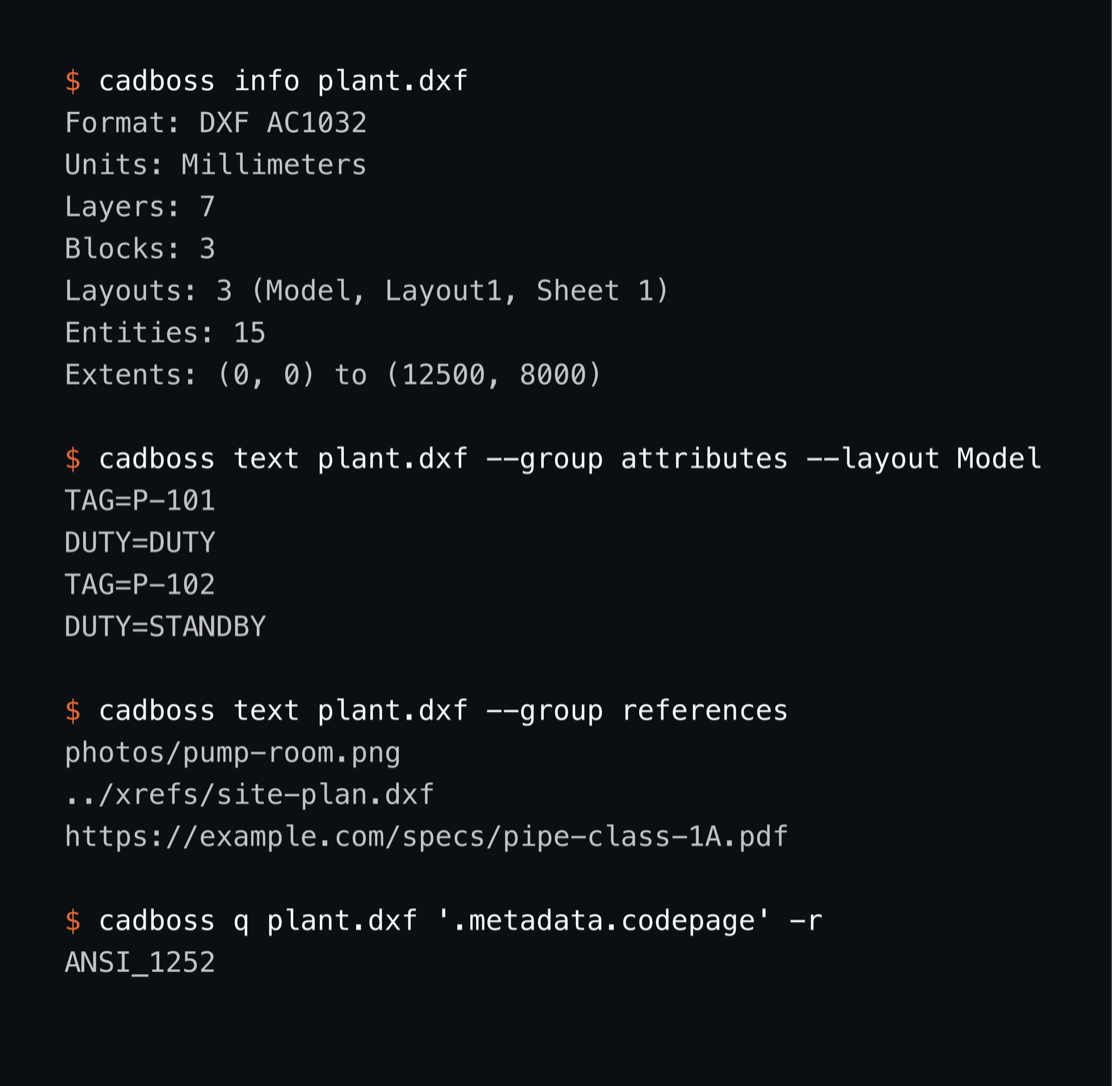
cadboss text plant.dxf --group attributes --layout Model, all lines
TAG=P-101
DUTY=DUTY
TAG=P-102
DUTY=STANDBY
Xref paths, image paths and PE_URL hyperlinks.
cadboss text plant.dxf --group references, all lines
photos/pump-room.png
../xrefs/site-plan.dxf
https://example.com/specs/pipe-class-1A.pdf
Layer and block names.
cadboss text plant.dxf --group names, 4 of 10 lines
EQUIPMENT
PIPING
TITLEBLOCK
SITE-PLAN
Version, codepage, units, author, created and updated dates, extents and per-type entity counts, next to the layer and layout tables, the block names and the report.
cadboss info plant.dxf, 3 of 7 lines
Format: DXF AC1032
Units: Millimeters
Extents: (0, 0) to (12500, 8000)
Items are ordered by layout tab, then layer, then top to bottom and left to right. The properties group exists in the model and stays empty for DXF.
The command line
cargo install cadboss-cli installs the cadboss binary. It prints the metadata, the text by group or layout, Markdown or JSON; cadboss q runs a jq program over the JSON export without writing it to disk, and cadboss obj prints the raw group codes of one handle. Skipped content is reported on stderr.
$ cadboss q plant.dxf '.text.annotations[] | select(.source == "Dimension") | .text' -r
6000
300+0.1/-0.2
12000
$ cadboss q plant.dxf '.layouts[] | "\(.name) \(.kind) \(.entity_count)"' -r
Model Model 14
Layout1 Paper 0
Sheet 1 Paper 1
$ cadboss obj plant.dxf 140
0	LINE
5	140
330	109
100	AcDbEntity
8	PIPING
100	AcDbLine
10	3000.0
20	4300.0
30	0.0
11	3000.0
21	7500.0
31	0.0
1001	PE_URL
1002	{
1000	https://example.com/specs/pipe-class-1A.pdf
1002	}
Handle 140 is the piping line that carries the hyperlink in the references group. Every command with its output.
Python
pip install cadboss installs prebuilt abi3 wheels for CPython 3.12 and later. One Document class carries the metadata, the layouts, the layers, the text groups and the report.
Document.open reads the file into one buffer after checking its size against max_bytes; Document.load copies the bytes it is given. Pass budget={"max_entities": 100_000} to either.
import cadboss

doc = cadboss.Document.open("plant.dxf")                 # or Document.load(raw_bytes)
print(doc.format, doc.version, doc.units)
for layout in doc.layouts:                              # name, kind ("Model" or "Paper"), entity_count
    print(layout.name, layout.kind, layout.entity_count)
for item in doc.text("attributes"):                     # title-block, annotations, names, attributes, references, all
    print(item.layout, item.layer, item.text, item.height)
for skipped in doc.report():                            # what the reader could not decode, counted
    print(skipped.kind, skipped.reason, skipped.count)
open("plant.md", "w").write(doc.markdown(title="Pump plan"))$ python3 readme.py | head -n 1
DXF AC1032 MillimetersDamaged and huge files
Searching a plant’s drawings means getting the text out of files that are hundreds of megabytes, often damaged, and written by a dozen different exporters. cadboss decodes every record in place and returns what it could read plus a report of what it could not.
Skipped { kind, reason, count } notes, never errors.$ head -c 6000 plant.dxf > truncated.dxf
$ cadboss info truncated.dxf
Format: DXF AC1032
Units: Millimeters
Layers: 7
Blocks: 3
Layouts: 2 (Model, Layout1)
Entities: 4
Extents: (0, 0) to (12500, 8000)
Report: 1 section skipped (truncated), 1 entity skipped (unknown)
warning: 1 section skipped (truncated), 1 entity skipped (unknown)
$ cadboss info plant.dxf --budget max_entities=5
Format: DXF AC1032
Units: Millimeters
Layers: 7
Blocks: 3
Layouts: 3 (Model, Layout1, Sheet 1)
Entities: 6
Extents: (0, 0) to (12500, 8000)
Report: 4 entities skipped (entity_limit)
warning: 4 entities skipped (entity_limit)The cut file still yields its 7 layers, 3 blocks and 4 entities; the truncated section and an unknown entity land in the report.
| Path | Peak RSS | Anonymous | Time | Gates |
|---|---|---|---|---|
| cadboss text (memory-mapped) | 1.76x input | 0.76x input | 1.3 s | anonymous ≤ 1.0x, RSS ≤ 2.0x |
| Document.open(path).markdown() (one owned buffer) | 1.87x input | 1.87x input | 1.4 s | anonymous ≤ 2.0x, RSS ≤ 2.5x |
Measured, not estimated: benchmarks/memory.py generates the drawing and gates every run of make bench. Apple M3 Pro, release build. The shapes that hurt most are flat: 40 000 text entities on 40 000 distinct layers render to Markdown in 0.04 s, 200 000 lines across 100 paper layouts export to JSON in 0.12 s, and json --entities on a 26 MB drawing peaks at 49 MB because the entity arrays stream instead of building a tree. The benchmarks.
Crates and packages
One Rust core behind every interface. Each layer depends only on the ones above it in this list, and the Python package wraps the same reader.
cadboss-corecrates.io
Source (mmap or owned bytes), budgets, report, errors, geometry.
cadboss-modelcrates.io
The format-independent document: metadata, layers, blocks, layouts, text groups, entities.
cadboss-dxfcrates.io
The DXF reader: tape lexer, binary and ASCII, header, tables, blocks, layouts, in-place entity decoder, text groups.
cadboss-outputcrates.io
Markdown and JSON writers.
cadboss-clicrates.io
The cadboss binary and its Claude Code skill.
cadbossPyPI
The Python package (pyo3, maturin, abi3).
Scope
In the CLI, the crates and the Python package.
ANSI_1252 and ISO-8859-1In this order. Not shipped.
Parts of a DXF file that are not extracted yet.
Every command accepts --threads; it is reserved and currently unused.
FAQ